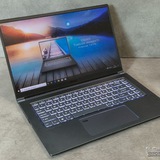
Can anyone diagnose what's wrong with my Katana.
https://reddit.com/link/1qbxu2j/video/9pgq2c3ll5dg1/player
The laptop won't turn on at all, and the power button briefly turns on after plugging in the charger, before shutting off again. Any advice would be appreciated.
https://redd.it/1qbxu2j
@MSILaptops
https://reddit.com/link/1qbxu2j/video/9pgq2c3ll5dg1/player
The laptop won't turn on at all, and the power button briefly turns on after plugging in the charger, before shutting off again. Any advice would be appreciated.
https://redd.it/1qbxu2j
@MSILaptops
Reddit
From the MSILaptops community on Reddit
Explore this post and more from the MSILaptops community
I would like to buy an MSI Thin 15 B7VF-217XRO laptop
I would like to buy an MSI Thin 15 B7VF-217XRO laptop, and I'd like to get some information from people who own this model.
For example, I'm interested in:
how loud the fans are
how high the temperatures get during gaming
how games perform on it
how durable the laptop is
and whether the 45W RTX 4060 is much worse compared to the ~100W versions
I'd appreciate any feedback or experience you can share.
Thank you in advance for your answers!
https://redd.it/1qbx8jr
@MSILaptops
I would like to buy an MSI Thin 15 B7VF-217XRO laptop, and I'd like to get some information from people who own this model.
For example, I'm interested in:
how loud the fans are
how high the temperatures get during gaming
how games perform on it
how durable the laptop is
and whether the 45W RTX 4060 is much worse compared to the ~100W versions
I'd appreciate any feedback or experience you can share.
Thank you in advance for your answers!
https://redd.it/1qbx8jr
@MSILaptops
Reddit
From the MSILaptops community on Reddit
Explore this post and more from the MSILaptops community
Keyboard LEDs on MSI GE66 Raider
Hello, my father recently bought an MSI GE66 Raider laptop and he wants to activate the LED backlights on the keyboard. I've tried many things but can't figure it out. I've had an MSI laptop before and I was able to activate them using Dragon Center, but I don't understand how to do it on his, even after searching online. If someone could help me, otherwise he's sending the PC back to the sender. I only have two days to figure it out.
P.S.: The PC must be from the United States because the keyboard is QWERTY.
https://redd.it/1qcl6ts
@MSILaptops
Hello, my father recently bought an MSI GE66 Raider laptop and he wants to activate the LED backlights on the keyboard. I've tried many things but can't figure it out. I've had an MSI laptop before and I was able to activate them using Dragon Center, but I don't understand how to do it on his, even after searching online. If someone could help me, otherwise he's sending the PC back to the sender. I only have two days to figure it out.
P.S.: The PC must be from the United States because the keyboard is QWERTY.
https://redd.it/1qcl6ts
@MSILaptops
Reddit
From the MSILaptops community on Reddit
Explore this post and more from the MSILaptops community
MSI GF63 charging super slow, shows only 25W
Hey, I’m having a really frustrating issue with my MSI GF63. Even with the original charger, it seems to only charge at around 25W, which is super slow.
I checked BIOS → Main → System Information, and I can’t see anything about the charger at all. The laptop still charges a little, but sometimes the battery drops even while plugged in.
I’m not sure what’s going on. I’ve tried:
• Plugging/unplugging
• Moving the cable around
• Restarting the laptop
I have no idea if it’s the charger, the charging port, or something else.
https://redd.it/1qcqths
@MSILaptops
Hey, I’m having a really frustrating issue with my MSI GF63. Even with the original charger, it seems to only charge at around 25W, which is super slow.
I checked BIOS → Main → System Information, and I can’t see anything about the charger at all. The laptop still charges a little, but sometimes the battery drops even while plugged in.
I’m not sure what’s going on. I’ve tried:
• Plugging/unplugging
• Moving the cable around
• Restarting the laptop
I have no idea if it’s the charger, the charging port, or something else.
https://redd.it/1qcqths
@MSILaptops
Reddit
From the MSILaptops community on Reddit
Explore this post and more from the MSILaptops community
fans not kicking in and bad game performance?
Pretty much what the noscript says. I have a Katana GF66 12UE and games are running extremely poorly with crashes, freezes and constant low frame rate. However, the fans sometimes kick in whilst the game is running and once that happens everything runs really smoothly. This doesn't always happen though and when it does it takes a good amount of time (20 min to an hour). It's kept on a flat surface to allow good ventilation and the performance mode is set to best performance. Not sure what to do :(
https://redd.it/1qcsook
@MSILaptops
Pretty much what the noscript says. I have a Katana GF66 12UE and games are running extremely poorly with crashes, freezes and constant low frame rate. However, the fans sometimes kick in whilst the game is running and once that happens everything runs really smoothly. This doesn't always happen though and when it does it takes a good amount of time (20 min to an hour). It's kept on a flat surface to allow good ventilation and the performance mode is set to best performance. Not sure what to do :(
https://redd.it/1qcsook
@MSILaptops
Reddit
From the MSILaptops community on Reddit
Explore this post and more from the MSILaptops community
MSI SWORD 16 HX B14V Started Heavily Throttling down randomly while gaming
Hi, my laptop just started randomly heavily throttling down while playing intensive games, after playing for about 10-15 minutes the laptop suddenly slows down completely and Fans start running full blast, after about 30 second it stops or when i jump out of the game on desktop.
This happens in games like BF6, Arc Raiders, HellDivers or some VR games
I tried disabling PROCHOT in the BIOS if it could be some fualty sensor triggering it, but it was still happening
I tried undevolting the CPU did not help
Everything is up to date GPU drivers, Bios drivers etc.
The laptop is 1 year old and this was not happening before.
I dont really know what to any more, any help will be appreciated.
I am attaching screenshot showing info from MSI Afterburner when the before and during thorttling.
https://preview.redd.it/kvyzmmy6acdg1.png?width=502&format=png&auto=webp&s=e6f9f9bef3894276017d2bce25ede61cbd657df3
https://redd.it/1qcrd05
@MSILaptops
Hi, my laptop just started randomly heavily throttling down while playing intensive games, after playing for about 10-15 minutes the laptop suddenly slows down completely and Fans start running full blast, after about 30 second it stops or when i jump out of the game on desktop.
This happens in games like BF6, Arc Raiders, HellDivers or some VR games
I tried disabling PROCHOT in the BIOS if it could be some fualty sensor triggering it, but it was still happening
I tried undevolting the CPU did not help
Everything is up to date GPU drivers, Bios drivers etc.
The laptop is 1 year old and this was not happening before.
I dont really know what to any more, any help will be appreciated.
I am attaching screenshot showing info from MSI Afterburner when the before and during thorttling.
https://preview.redd.it/kvyzmmy6acdg1.png?width=502&format=png&auto=webp&s=e6f9f9bef3894276017d2bce25ede61cbd657df3
https://redd.it/1qcrd05
@MSILaptops
Have I bricked my MSI laptop?
Question from an IT numpty.
A couple of hours ago I ran my MSI for about 30 minutes on the battery, which I almost never do. When I plugged the charger back in, it wouldn’t charge - it’s one of those rectangular plugs that look like a USB A. Following some advice off the internet, I unplugged it, pressed and held the power button for 30 seconds, and now it won’t turn back on either or without the charger.
Have I bricked it to the point I’ll have to get it repaired?
https://redd.it/1qcxjtw
@MSILaptops
Question from an IT numpty.
A couple of hours ago I ran my MSI for about 30 minutes on the battery, which I almost never do. When I plugged the charger back in, it wouldn’t charge - it’s one of those rectangular plugs that look like a USB A. Following some advice off the internet, I unplugged it, pressed and held the power button for 30 seconds, and now it won’t turn back on either or without the charger.
Have I bricked it to the point I’ll have to get it repaired?
https://redd.it/1qcxjtw
@MSILaptops
Reddit
From the MSILaptops community on Reddit
Explore this post and more from the MSILaptops community
Laptop backpack
So I’m trying to find a good back pack for my Katana A17. I’ve done some research but can’t really decide what’s the best versus cost as well. I have looked at the titan gaming backpack but unsure basically. Could anyone give me some reviews of what the have or like?
https://redd.it/1qd4ovw
@MSILaptops
So I’m trying to find a good back pack for my Katana A17. I’ve done some research but can’t really decide what’s the best versus cost as well. I have looked at the titan gaming backpack but unsure basically. Could anyone give me some reviews of what the have or like?
https://redd.it/1qd4ovw
@MSILaptops
Reddit
From the MSILaptops community on Reddit
Explore this post and more from the MSILaptops community
Screen replacement for stealth gs66
I got a Msi stealth gs66 3080ti less than a year ago, i got it second hand but it was in pristine condition, no scratches or anything. Recently the screen went out, completely black, it still boots up and everything fine, been using a portable monitor with it. The thing is though I can’t find a screen replacement anywhere, I found my exact model on one website but they’re out of stock of that specific screen. Does anyone know if these screens can be replaced with a similar model, say I have the gs66 12UH-127, would a 12UH-066 work? I’d rather replace it myself. But if I really have to I’ll rma it through Msi, but I’m worried about mailing it out and it getting damaged or something happening.
https://redd.it/1qd451o
@MSILaptops
I got a Msi stealth gs66 3080ti less than a year ago, i got it second hand but it was in pristine condition, no scratches or anything. Recently the screen went out, completely black, it still boots up and everything fine, been using a portable monitor with it. The thing is though I can’t find a screen replacement anywhere, I found my exact model on one website but they’re out of stock of that specific screen. Does anyone know if these screens can be replaced with a similar model, say I have the gs66 12UH-127, would a 12UH-066 work? I’d rather replace it myself. But if I really have to I’ll rma it through Msi, but I’m worried about mailing it out and it getting damaged or something happening.
https://redd.it/1qd451o
@MSILaptops
Reddit
From the MSILaptops community on Reddit
Explore this post and more from the MSILaptops community
Possible airflow issue with MSI GF65 Thin 10UE
I can't feel any air coming out of the side vent even while running Cooler Boost on Dragon Center, which raises RPM on the fans to 7000/6000. Even blocking out the back fans with the side of my hand doesn't make any air come out the side. If anyone else has a similar model, is this normal, or are my temps because of *something* having completely occluded one of the fan vents?
P.S. Last I opened it up, the fan used smaller screws than the M2.5x5 and the M2.5x4 described in the disassembly guide so I couldn't quite get my 2.5 screwdriver in there and I had nothing smaller - thought about using a knife's edge but it felt just not right. Can anyone tell me what size screw was that supposed to be?
Disassembly guide: https://forum-en.msi.com/index.php?attachments/ms-16w2-disassemble-sop-en-pdf.158824/
https://redd.it/1qd8c0i
@MSILaptops
I can't feel any air coming out of the side vent even while running Cooler Boost on Dragon Center, which raises RPM on the fans to 7000/6000. Even blocking out the back fans with the side of my hand doesn't make any air come out the side. If anyone else has a similar model, is this normal, or are my temps because of *something* having completely occluded one of the fan vents?
P.S. Last I opened it up, the fan used smaller screws than the M2.5x5 and the M2.5x4 described in the disassembly guide so I couldn't quite get my 2.5 screwdriver in there and I had nothing smaller - thought about using a knife's edge but it felt just not right. Can anyone tell me what size screw was that supposed to be?
Disassembly guide: https://forum-en.msi.com/index.php?attachments/ms-16w2-disassemble-sop-en-pdf.158824/
https://redd.it/1qd8c0i
@MSILaptops
MSI Katana GF76 battery issues
Hey guys, my girlfriend has this laptop with incredible battery issues, randomly it will drop in percentage in extremely fast cases, even when it’s continuously plugged in. I ran a powercfg scan to see that the battery is around 68% its total life. I’m leaning towards buying a new battery but wanted to get confirmation that this would be a reasonable thing before I spend the money.
https://redd.it/1qdcn9l
@MSILaptops
Hey guys, my girlfriend has this laptop with incredible battery issues, randomly it will drop in percentage in extremely fast cases, even when it’s continuously plugged in. I ran a powercfg scan to see that the battery is around 68% its total life. I’m leaning towards buying a new battery but wanted to get confirmation that this would be a reasonable thing before I spend the money.
https://redd.it/1qdcn9l
@MSILaptops
Reddit
From the MSILaptops community on Reddit
Explore this post and more from the MSILaptops community
Screen extenders (dual/triple)
Just wondering if anyone owns or has used screen extenders and what yall would recommend?
I use a MSI prestige 14 AI EVO ultra 7 laptop if it helps.
https://redd.it/1qdf73o
@MSILaptops
Just wondering if anyone owns or has used screen extenders and what yall would recommend?
I use a MSI prestige 14 AI EVO ultra 7 laptop if it helps.
https://redd.it/1qdf73o
@MSILaptops
Reddit
From the MSILaptops community on Reddit
Explore this post and more from the MSILaptops community
About MSI's Modern 15H
I bought an MSI Modern 15H C13M with a Core i9 and 32GB RAM a little over a year ago, and I've had it repaired about three or four times since. Almost every time, the keyboard unit breaks and one of the keys stops working, and this time it seems like the power key is gone. What's more, when I put it in sleep mode and carry it around, only the backlight comes on and the screen goes black and it freezes. Even when I put it into hibernation mode, it freezes and won't start up. It's a crappy mess. I'm a university student and I often carry it in my backpack, but even so, I think it's too prone to breaking down. What about everyone else? (I'm using Google Translate, so sorry if there are any strange parts.)
https://redd.it/1qdgo1k
@MSILaptops
I bought an MSI Modern 15H C13M with a Core i9 and 32GB RAM a little over a year ago, and I've had it repaired about three or four times since. Almost every time, the keyboard unit breaks and one of the keys stops working, and this time it seems like the power key is gone. What's more, when I put it in sleep mode and carry it around, only the backlight comes on and the screen goes black and it freezes. Even when I put it into hibernation mode, it freezes and won't start up. It's a crappy mess. I'm a university student and I often carry it in my backpack, but even so, I think it's too prone to breaking down. What about everyone else? (I'm using Google Translate, so sorry if there are any strange parts.)
https://redd.it/1qdgo1k
@MSILaptops
Reddit
From the MSILaptops community on Reddit
Explore this post and more from the MSILaptops community
GPU hard cap at 40W?
After a windows update, i can no longer play on battery since GPU wattage is stuck at 40W.
I know it is terrible to play on battery but I just recently bough a 140W usb C charger since the original 330W power brick is too bulky for outside use. Its a perfect setup for me until a windows update happened.
It works fine for discrete gpu/only happens to hyrbid mode but switching is a hassle since you need a restart.
Any known fix for this? Im 90% sure its a windows thing and not the gpu driver.
P. S :
-Already tried fix windows by reinstall
-Both Cpu and Gpu drivers are updated.
https://redd.it/1qdetlx
@MSILaptops
After a windows update, i can no longer play on battery since GPU wattage is stuck at 40W.
I know it is terrible to play on battery but I just recently bough a 140W usb C charger since the original 330W power brick is too bulky for outside use. Its a perfect setup for me until a windows update happened.
It works fine for discrete gpu/only happens to hyrbid mode but switching is a hassle since you need a restart.
Any known fix for this? Im 90% sure its a windows thing and not the gpu driver.
P. S :
-Already tried fix windows by reinstall
-Both Cpu and Gpu drivers are updated.
https://redd.it/1qdetlx
@MSILaptops
Reddit
From the MSILaptops community on Reddit
Explore this post and more from the MSILaptops community
Msi stuck at boot
Hello everyone. I'm seeking help for my Pulse 16 AI C1VGKG.
earlier today, it worked fine, and now it refuses to boot.
When pressing the power button, the keyboard light up, but it doesn't do anything more.
The caps/num lock leds never light up even after pressing the associated key.
The screen stays black.
The fans goes a bit louder after a few seconds.
It was never dropped.
Ram sticks never changed.
I already tried the pin under the laptop, after that it refused to power on until i plugged it in.
Can someone help me make it work again?
https://redd.it/1qdmybz
@MSILaptops
Hello everyone. I'm seeking help for my Pulse 16 AI C1VGKG.
earlier today, it worked fine, and now it refuses to boot.
When pressing the power button, the keyboard light up, but it doesn't do anything more.
The caps/num lock leds never light up even after pressing the associated key.
The screen stays black.
The fans goes a bit louder after a few seconds.
It was never dropped.
Ram sticks never changed.
I already tried the pin under the laptop, after that it refused to power on until i plugged it in.
Can someone help me make it work again?
https://redd.it/1qdmybz
@MSILaptops
Reddit
From the MSILaptops community on Reddit
Explore this post and more from the MSILaptops community
Vbios flashing
I was wondering if anyone had information on vbios swapping an 5070ti MSI Stealth A16 AI+ A3XWHG-207US.
I found a 140w vbios from the msi vector but it was still being limited to 90-105w all while being below 70c.
Any help is appreciated.
https://redd.it/1qdooth
@MSILaptops
I was wondering if anyone had information on vbios swapping an 5070ti MSI Stealth A16 AI+ A3XWHG-207US.
I found a 140w vbios from the msi vector but it was still being limited to 90-105w all while being below 70c.
Any help is appreciated.
https://redd.it/1qdooth
@MSILaptops
Reddit
From the MSILaptops community on Reddit
Explore this post and more from the MSILaptops community