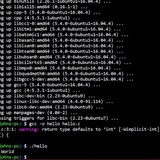
Why is my Guess game doing this? I can't see what the problem is. Maybe one of you can?
https://redd.it/15sol82
@r_bash
https://redd.it/15sol82
@r_bash
tmuxo - A bash noscript to create + attach or create + switch(if exists) tmux sessions
https://redd.it/15sxh1r
@r_bash
#!/usr/bin/env bash

# Script to create + attach or switch to an existing tmux session

# Inspired from the followings:
# 1) https://github.com/thuanowa/tmux-fzf-session-switch
# 2) https://github.com/ThePrimeagen/.dotfiles/blob/master/bin/.local/noscripts/tmux-sessionizer

function tmuxOpen {
    if [[ -z $TMUX ]] ; then
        tmux attach -t "$1"
    else
        tmux switch-client -t "$1"
    fi
    exit 0
}

function main {

    local sessions
    local sess_arr
    local retval

    local session
    local query

    sessions=$(tmux list-sessions -F "#{session_name}" | fzf --exit-0 --print-query --reverse)
    retval=$?

    # echo "$sessions"
    # echo "$retval"

    IFS=$'\n' read -rd '' -a sess_arr <<<"$sessions"

    session=${sess_arr[1]}
    query=${sess_arr[0]}

    # echo "$session"
    # echo "$query"

    if [[ $retval == 0 ]]; then
        if [[ "$session" == "" ]]; then
            session="$query"
        fi
        printf "Switching to existing tmux session named [$session]\n"
    else
        if [[ -z "$query" ]]; then
            printf "Invalid session name \"$query\"\nExiting.\n"
            exit 1
        fi
        session="$query"
        printf "Creating new tmux session named [$session] and attaching\n"
        tmux new-session -d -s "$session"
    fi
    tmuxOpen "$session"
}
main
https://redd.it/15sxh1r
@r_bash
Reddit
From the bash community on Reddit: tmuxo - A bash noscript to create + attach or create + switch(if exists) tmux sessions
Explore this post and more from the bash community
Help with AWK noscript
I have the following awk noscript and the text file that I am parsing in this pastebin https://pastebin.com/sFps8wSF. I need this noscript to find out per sequence how many CPUs run under 80% idle and for how long. And then whatever the lowest %idle is, how many CPU's reach within 10% of the lowest and possibly for how long. In the text file example I gave in the pastebin , there are 2 sequences. The output I am expecting is
> Time Block Start: 10:08:29 AM
> CPUs running under 80% idle: 2
> CPU 1 Total time below 80%: 25 seconds
> CPU 4 Total time below 80%: 25 seconds
> CPUs reaching within 10% of lowest %idle: 2
> Time Block End: 10:08:29 AM
>
>
> Time Block Start: 10:13:29 AM
> CPUs running under 80% idle: 1
> CPU 4 Total time below 80%: 25 seconds
> CPUs reaching within 10% of lowest %idle: 2
> Time Block End: 10:13:29 AM
But what I am getting is
> Time Block Start: 10:08:29 AM
> CPUs running under 80% idle: 0
> CPUs reaching within 10% of lowest %idle: 0
> Time Block End: 10:08:29 AM
>
>
> Time Block Start: 10:13:29 AM
> CPUs running under 80% idle: 0
> CPUs reaching within 10% of lowest %idle: 0
> Time Block End: 10:13:29 AM
If anyone knows why my noscript is doing this , I would really appreciate the help!
https://redd.it/15sydwp
@r_bash
I have the following awk noscript and the text file that I am parsing in this pastebin https://pastebin.com/sFps8wSF. I need this noscript to find out per sequence how many CPUs run under 80% idle and for how long. And then whatever the lowest %idle is, how many CPU's reach within 10% of the lowest and possibly for how long. In the text file example I gave in the pastebin , there are 2 sequences. The output I am expecting is
> Time Block Start: 10:08:29 AM
> CPUs running under 80% idle: 2
> CPU 1 Total time below 80%: 25 seconds
> CPU 4 Total time below 80%: 25 seconds
> CPUs reaching within 10% of lowest %idle: 2
> Time Block End: 10:08:29 AM
>
>
> Time Block Start: 10:13:29 AM
> CPUs running under 80% idle: 1
> CPU 4 Total time below 80%: 25 seconds
> CPUs reaching within 10% of lowest %idle: 2
> Time Block End: 10:13:29 AM
But what I am getting is
> Time Block Start: 10:08:29 AM
> CPUs running under 80% idle: 0
> CPUs reaching within 10% of lowest %idle: 0
> Time Block End: 10:08:29 AM
>
>
> Time Block Start: 10:13:29 AM
> CPUs running under 80% idle: 0
> CPUs reaching within 10% of lowest %idle: 0
> Time Block End: 10:13:29 AM
If anyone knows why my noscript is doing this , I would really appreciate the help!
https://redd.it/15sydwp
@r_bash
Pastebin
awkhelp - Pastebin.com
Pastebin.com is the number one paste tool since 2002. Pastebin is a website where you can store text online for a set period of time.
Need help finding subfolders' sizes and file counts
I need to generate a list of the content of a folder that looks something like this.
main folder/subfolderA/folder A
main folder/subfolderA/folder B
main folder/subfolderA/folder C
main folder/subfolderA/d.zip
main folder/subfolderA/e.exe
main folder/subfolderA/f.jpg
main folder/subfolderB/folder G
main folder/subfolderB/folder H
main folder/subfolderB/folder I
main folder/subfolderB/j.zip
main folder/subfolderB/k.exe
main folder/subfolderA/l.jpg
...
I would like the output to be like this (the format of folder sizes and file counts isn't set in stone, but after the paths).
main folder/subfolderA/folder A 500 MB 50 files
main folder/subfolderA/folder B 500 MB 50 files
main folder/subfolderA/folder C 500 MB 50 files
main folder/subfolderA/d.zip
main folder/subfolderB/folder E 500 MB 50 files
main folder/subfolderB/folder F 500 MB 50 files
main folder/subfolderB/folder G 500 MB 50 files
main folder/subfolderB/j.zip
...
I've been able to find the ZIP files with
Can I adapt the second command to include that?
These two commands + sort generate this:
main folder/
main folder/subfolderA
main folder/subfolderA/folder A
main folder/subfolderA/folder B
main folder/subfolderA/folder C
main folder/subfolderA/d.zip
main folder/subfolderB
main folder/subfolderB/folder G
main folder/subfolderB/folder H
main folder/subfolderB/folder I
main folder/subfolderB/j.zip
...
I've also tried
Any advice is appreciated!
EDIT: I misread the link. I'm able to swap the paths and sizes using this, but it seems incompatible with paths with spaces.
https://redd.it/15swwu0
@r_bash
I need to generate a list of the content of a folder that looks something like this.
main folder/subfolderA/folder A
main folder/subfolderA/folder B
main folder/subfolderA/folder C
main folder/subfolderA/d.zip
main folder/subfolderA/e.exe
main folder/subfolderA/f.jpg
main folder/subfolderB/folder G
main folder/subfolderB/folder H
main folder/subfolderB/folder I
main folder/subfolderB/j.zip
main folder/subfolderB/k.exe
main folder/subfolderA/l.jpg
...
I would like the output to be like this (the format of folder sizes and file counts isn't set in stone, but after the paths).
main folder/subfolderA/folder A 500 MB 50 files
main folder/subfolderA/folder B 500 MB 50 files
main folder/subfolderA/folder C 500 MB 50 files
main folder/subfolderA/d.zip
main folder/subfolderB/folder E 500 MB 50 files
main folder/subfolderB/folder F 500 MB 50 files
main folder/subfolderB/folder G 500 MB 50 files
main folder/subfolderB/j.zip
...
I've been able to find the ZIP files with
/path -iname \*.zip, and
/path -type d -printgets the folders, but I'm having trouble finding a solution for listing the folders' sizes and number of files.
Can I adapt the second command to include that?
These two commands + sort generate this:
main folder/
main folder/subfolderA
main folder/subfolderA/folder A
main folder/subfolderA/folder B
main folder/subfolderA/folder C
main folder/subfolderA/d.zip
main folder/subfolderB
main folder/subfolderB/folder G
main folder/subfolderB/folder H
main folder/subfolderB/folder I
main folder/subfolderB/j.zip
...
I've also tried
-h --max-depth=2 /path, which gets folder sizes, but places them in the front of the path, making it harder to read and sort. Not sure what this output is considered (columns?), I tried swapping like this, but that only changed the values of the folder sizes.
Any advice is appreciated!
EDIT: I misread the link. I'm able to swap the paths and sizes using this, but it seems incompatible with paths with spaces.
https://redd.it/15swwu0
@r_bash
Stack Overflow
Swap columns of a file - Linux (exact position, not word)
I would like to know how to swap columns (the exact character) of a file with Linux (using cut, awk, sed or whatever you can help me with).
I have seen how to swap a whole expression (using delimit...
I have seen how to swap a whole expression (using delimit...
How do I alias cd to print "c deez nuts nerd" and then execute the directory change?
Trying to play a prank on my friend who leaves his laptop open all the time.
https://redd.it/15t0uv9
@r_bash
Trying to play a prank on my friend who leaves his laptop open all the time.
https://redd.it/15t0uv9
@r_bash
Reddit
From the bash community on Reddit
Explore this post and more from the bash community
Music sorting program
I challenged my friend to send me an entirely unorganized folder of song files. I am trying to organize this using bash, but the moon runes that is terminal speak are eluding me. Can I get some advice on how I would organize the song files into folders based on their album tag?
https://redd.it/15szpsp
@r_bash
I challenged my friend to send me an entirely unorganized folder of song files. I am trying to organize this using bash, but the moon runes that is terminal speak are eluding me. Can I get some advice on how I would organize the song files into folders based on their album tag?
https://redd.it/15szpsp
@r_bash
Reddit
From the bash community on Reddit
Explore this post and more from the bash community
Is there any point in migrating from ZSH to Bash?
Hi everyone, I've been using zsh for about 2+ years now & haven't had any complaints.
I recently thought of switching to Bash because of a new video "The Linux Cast" posted, but I'm not sure if it's actually worth it or just made for clickbait or something to talk about.
I'm a full-stack web developer for my job, but I've never really had to write any noscripts. I've VERY rarely had to SSH into a server, but when I have I'm pretty comfortable with the commands since I use zsh.
Is there any point in switching to Bash? I don't really use the terminal for much rather than basic stuff. I'm assuming if I ever have to write a Bash noscript, I would do it in an IDE and use a Bash shebang anyway, so not sure if there are any benefits to switching.
Thanks in advance!
https://redd.it/15t7wkg
@r_bash
Hi everyone, I've been using zsh for about 2+ years now & haven't had any complaints.
I recently thought of switching to Bash because of a new video "The Linux Cast" posted, but I'm not sure if it's actually worth it or just made for clickbait or something to talk about.
I'm a full-stack web developer for my job, but I've never really had to write any noscripts. I've VERY rarely had to SSH into a server, but when I have I'm pretty comfortable with the commands since I use zsh.
Is there any point in switching to Bash? I don't really use the terminal for much rather than basic stuff. I'm assuming if I ever have to write a Bash noscript, I would do it in an IDE and use a Bash shebang anyway, so not sure if there are any benefits to switching.
Thanks in advance!
https://redd.it/15t7wkg
@r_bash
YouTube
Why I Switched Back to Bash, And Why You Should Too
Today I talk about my recent switch away from ZSH and to Bash.
👇 PULL IT DOWN FOR THE GOOD STUFF 👇
Patreon - https://patreon.com/thelinuxcast
Paypal - https://paypal.me/thelinuxcast
Youtube - https://www.youtube.com/channel/UCylGUf9BvQooEFjgdNudoQg/join…
👇 PULL IT DOWN FOR THE GOOD STUFF 👇
Patreon - https://patreon.com/thelinuxcast
Paypal - https://paypal.me/thelinuxcast
Youtube - https://www.youtube.com/channel/UCylGUf9BvQooEFjgdNudoQg/join…
Is there zsh/fish-like autosuggestions, completions, and syntax highlighting in Bash?
Hi everyone,
I've been using ZSH for about 2 years now, but I'm thinking of migrating to Bash. Does Bash have Fish-like features such as autosuggestions, auto-completion, or syntax highlighting?
In zsh, whenever I'm looking through a directory & press `Tab`, I'm able to move through the suggested directories as well. Not sure if this is available on Bash.
Thanks in advance.
https://redd.it/15t7q2h
@r_bash
Hi everyone,
I've been using ZSH for about 2 years now, but I'm thinking of migrating to Bash. Does Bash have Fish-like features such as autosuggestions, auto-completion, or syntax highlighting?
In zsh, whenever I'm looking through a directory & press `Tab`, I'm able to move through the suggested directories as well. Not sure if this is available on Bash.
Thanks in advance.
https://redd.it/15t7q2h
@r_bash
GitHub
GitHub - zsh-users/zsh-autosuggestions: Fish-like autosuggestions for zsh
Fish-like autosuggestions for zsh. Contribute to zsh-users/zsh-autosuggestions development by creating an account on GitHub.
Operation not permitted inside ec2 but works fine on local mac
​
https://preview.redd.it/tu8hrt8hpoib1.png?width=1512&format=png&auto=webp&s=cc6088e0a1de42aefcfc5b804c5e15b8ef0c8005
I have a bash noscript that basically downloads a few files inside /tmp
Inside the exit trap hander. all I am trying to do is cleanup
The rm -rf lines give me an operation not permitted error when run inside EC2 but work fine on the mac
If I add sudo rm -rf instead, it works fine on the EC2 instance but asks for a password on my mac
How do I resolve this?
Does it have some problems with /tmp? I can see that it belongs to root user and I am running commands as ec2-user inside my ec2 instance
https://redd.it/15tpy3l
@r_bash
​
https://preview.redd.it/tu8hrt8hpoib1.png?width=1512&format=png&auto=webp&s=cc6088e0a1de42aefcfc5b804c5e15b8ef0c8005
I have a bash noscript that basically downloads a few files inside /tmp
Inside the exit trap hander. all I am trying to do is cleanup
The rm -rf lines give me an operation not permitted error when run inside EC2 but work fine on the mac
If I add sudo rm -rf instead, it works fine on the EC2 instance but asks for a password on my mac
How do I resolve this?
Does it have some problems with /tmp? I can see that it belongs to root user and I am running commands as ec2-user inside my ec2 instance
https://redd.it/15tpy3l
@r_bash
LLaMA Terminal Completion, a local virtual assistant for the terminal
https://github.com/adammpkins/llama-terminal-completion
https://redd.it/15tsurv
@r_bash
https://github.com/adammpkins/llama-terminal-completion
https://redd.it/15tsurv
@r_bash
GitHub
GitHub - adammpkins/llama-terminal-completion: A Python application which interacts with the llama.cpp library to provide virtual…
A Python application which interacts with the llama.cpp library to provide virtual assistant capabilities through the command line. It allows you to ask questions and receive intelligent responses,...
find command to look for multiple files
Using bash 3.2 on a Macbook. I want to search the entire drive for files with specific names.
Thought the find command would be something like this:
find . -type f \\ (-name "test-1.2.14.rtf" -o -name "test-1.2.17.rtf" \\)
But that returns an error: unknown primary or operator.
Not sure what my mistake is.
​
https://redd.it/15txz07
@r_bash
Using bash 3.2 on a Macbook. I want to search the entire drive for files with specific names.
Thought the find command would be something like this:
find . -type f \\ (-name "test-1.2.14.rtf" -o -name "test-1.2.17.rtf" \\)
But that returns an error: unknown primary or operator.
Not sure what my mistake is.
​
https://redd.it/15txz07
@r_bash
Reddit
From the bash community on Reddit
Explore this post and more from the bash community
awk conditional weirdness
awk{
x=$1
printf("%s", x);
if(x > 100){
printf("=%s", x)
}}
but the output is
5=5
https://redd.it/15u2its
@r_bash
awk{
x=$1
printf("%s", x);
if(x > 100){
printf("=%s", x)
}}
but the output is
5=5
https://redd.it/15u2its
@r_bash
Reddit
From the bash community on Reddit
Explore this post and more from the bash community
home directory is spammed with temporary bash history files.
only has been a problem on fedora never happened on ubuntu(i still love fedora though). how do i fix it?
https://redd.it/15u5nk7
@r_bash
only has been a problem on fedora never happened on ubuntu(i still love fedora though). how do i fix it?
https://redd.it/15u5nk7
@r_bash
Reddit
From the bash community on Reddit
Explore this post and more from the bash community
Need to extract variable from prompt
When I give command kinit then it prompts me to enter the password.
[root]:Inbound> kinit
Password for username@ip_address:
I want to extract the username from the prompt that has given.
I have used set -x to achive this but it seems very primitive way
This is the noscript I am using currently.
#!bin/bash
prompt="random_gibbrish"
set -x
kinit < $prompt > $PWD/output2.txt
set +x
user=$(cat $PWD/output2.txt | awk '{print $3}' | awk -F "@" '{print $1}')
echo USER:::$user
Terminal Output---
[root]:Inbound> sh kinit.sh
+ kinit
kinit.sh: line 4:random_gibbrish : No such file or directory
+ set +x
USER:::username
it is giving me the right result but is there another way to do this?
Noob here.. need to learn how to enclose code in proper lines while asking question.. sorry for that..
https://redd.it/15uf7f3
@r_bash
When I give command kinit then it prompts me to enter the password.
[root]:Inbound> kinit
Password for username@ip_address:
I want to extract the username from the prompt that has given.
I have used set -x to achive this but it seems very primitive way
This is the noscript I am using currently.
#!bin/bash
prompt="random_gibbrish"
set -x
kinit < $prompt > $PWD/output2.txt
set +x
user=$(cat $PWD/output2.txt | awk '{print $3}' | awk -F "@" '{print $1}')
echo USER:::$user
Terminal Output---
[root]:Inbound> sh kinit.sh
+ kinit
kinit.sh: line 4:random_gibbrish : No such file or directory
+ set +x
USER:::username
it is giving me the right result but is there another way to do this?
Noob here.. need to learn how to enclose code in proper lines while asking question.. sorry for that..
https://redd.it/15uf7f3
@r_bash
Reddit
From the bash community on Reddit
Explore this post and more from the bash community
my PS1 ends with a tab character, using the "home" key to go to the beginning of the line messes up visually
so for example, if I have the following entered, where
echo hi|
and I press the following keys
<home>echo<space>
then I would expect the result to be
echo |echo hi
and this does work! but if I do it twice, something weird happens. if I press <end>
echo echo hi|
and then home again, the cursor goes inside the tab character
| echo echo hi
and now if I try typing "echo "
cho |eecho echo hi
if I try pressing enter, it is as if it was typed correctly, I do get
so to summarize, the necessary steps are: put a tab character at the end of PS1. type something. press home. type something. press end, then home again. type something.
is this news? does anyone know what I should do? my prompt actually ends with
https://redd.it/15ukgbk
@r_bash
so for example, if I have the following entered, where
| means "the current cursor position":echo hi|
and I press the following keys
<home>echo<space>
then I would expect the result to be
echo |echo hi
and this does work! but if I do it twice, something weird happens. if I press <end>
echo echo hi|
and then home again, the cursor goes inside the tab character
| echo echo hi
and now if I try typing "echo "
cho |eecho echo hi
if I try pressing enter, it is as if it was typed correctly, I do get
echo echo hi. this seems to happen in both konsole and xterm so I think it is a bash bug not a terminal bug.so to summarize, the necessary steps are: put a tab character at the end of PS1. type something. press home. type something. press end, then home again. type something.
is this news? does anyone know what I should do? my prompt actually ends with
\!:<tab> so I can't just use space characters.https://redd.it/15ukgbk
@r_bash
Reddit
From the bash community on Reddit
Explore this post and more from the bash community
BASH-only C/C++ shell TermiC V1.3 released
Improvements:
\- Support #ifdef/#elif/#else/#endif
\- Support the tcc compiler
\- Add command history
\- Python terminal style Ctrl-D Ctrl-C
\- Various bug fixes
https://github.com/hanoglu/TermiC
https://redd.it/15un51s
@r_bash
Improvements:
\- Support #ifdef/#elif/#else/#endif
\- Support the tcc compiler
\- Add command history
\- Python terminal style Ctrl-D Ctrl-C
\- Various bug fixes
https://github.com/hanoglu/TermiC
https://redd.it/15un51s
@r_bash
GitHub
GitHub - hanoglu/TermiC: GCC powered interactive C/C++ REPL terminal created with BASH
GCC powered interactive C/C++ REPL terminal created with BASH - hanoglu/TermiC
How do I make my prompt always displayed at the bottom of the terminal?
If I cat a large file, I would like to scroll up and down while still having my prompt displayed at the very bottom to type into. Is there a way to do this?
Also an unrelated question but related question is there a way to get back to my prompt (quickly and without entering any keyboard entries) if I do cat a large file? I can press enter but that executes the command, space but that adds a space into the line, ctrl +c but that adds a ^C. Is there a correct way to have the prompt show back up?
https://redd.it/15uq7ov
@r_bash
If I cat a large file, I would like to scroll up and down while still having my prompt displayed at the very bottom to type into. Is there a way to do this?
Also an unrelated question but related question is there a way to get back to my prompt (quickly and without entering any keyboard entries) if I do cat a large file? I can press enter but that executes the command, space but that adds a space into the line, ctrl +c but that adds a ^C. Is there a correct way to have the prompt show back up?
https://redd.it/15uq7ov
@r_bash
Reddit
From the bash community on Reddit
Explore this post and more from the bash community
This may be too much to ask but I'm writing a noscript to manage my game server and it's a complete mess. It's barely readable but it basically allows me to start, stop and (eventually) backup my server. Looking for efficiency and readability tips if possible! (hope a Pastebin link is ok)
https://pastebin.com/4LRp6RuQ
https://redd.it/15uyiph
@r_bash
https://pastebin.com/4LRp6RuQ
https://redd.it/15uyiph
@r_bash
Pastebin
pzserver - Pastebin.com
Pastebin.com is the number one paste tool since 2002. Pastebin is a website where you can store text online for a set period of time.
Can't merge two objects passed as --argjson to jq
I've written the following noscript to generate snippets for shellcheck automatically based on this Markdown document:
#!/usr/bin/env sh
generatesnippets() {
gslisturl='https://gist.githubusercontent.com/nicerobot/53cee11ee0abbdc997661e65b348f375/raw/d5a97b3b18ead38f323593532050f0711084acf1/shellcheck.md'
wget -O - "$gslisturl" 2> /dev/null |
jq -R '.' |
sed '1 s/"/"/; $! s/$/,/; $ s/"$/"/' |
jq 'withentries(
{
key: .value | capture("^- +\\[(?<x>SC\\d{4})\\]") | .x | asciidowncase,
value:
{
prefix: .value | capture("^- +\[(?<x>SC\\d{4})\\]") | .x | asciidowncase,
denoscription: .value | capture("SC\\d{4}\\]\\(.*?\\) (?<x>.+)$") | .x,
body: ("# shellcheck ${1|disable,enable|}=" + (.value | capture("^- +\\[(?<x>SC\\d{4})\\]") | .x))
}
}
)'
}
snippetpath=../snippets/snippets.json
jq '$ARGS.named"generated" + $ARGS.named"source"' --argjson generated "$(generatesnippets)" --argjson source "$(cat "$snippetpath")"
{
"sc1000": {
"prefix": "sc1000",
"denoscription": "$ is not used specially and should therefore be escaped.",
"body": "# shellcheck ${1|disable,enable|}=SC1000"
},
"sc1001": {
"prefix": "sc1001",
"denoscription": "This
"body": "# shellcheck ${1|disable,enable|}=SC1001"
},
"sc1003": {
"prefix": "sc1003",
"denoscription": "Want to escape a single quote? echo 'This is how it'\\\\''s done'.",
"body": "# shellcheck ${1|disable,enable|}=SC1003"
},
"sc1004": {
"prefix": "sc1004",
"denoscription": "This backslash+linefeed is literal. Break outside single quotes if you just want to break the line.",
"body": "# shellcheck ${1|disable,enable|}=SC1004"
....
The problem is
https://redd.it/15v0yf9
@r_bash
I've written the following noscript to generate snippets for shellcheck automatically based on this Markdown document:
#!/usr/bin/env sh
generatesnippets() {
gslisturl='https://gist.githubusercontent.com/nicerobot/53cee11ee0abbdc997661e65b348f375/raw/d5a97b3b18ead38f323593532050f0711084acf1/shellcheck.md'
wget -O - "$gslisturl" 2> /dev/null |
jq -R '.' |
sed '1 s/"/"/; $! s/$/,/; $ s/"$/"/' |
jq 'withentries(
{
key: .value | capture("^- +\\[(?<x>SC\\d{4})\\]") | .x | asciidowncase,
value:
{
prefix: .value | capture("^- +\[(?<x>SC\\d{4})\\]") | .x | asciidowncase,
denoscription: .value | capture("SC\\d{4}\\]\\(.*?\\) (?<x>.+)$") | .x,
body: ("# shellcheck ${1|disable,enable|}=" + (.value | capture("^- +\\[(?<x>SC\\d{4})\\]") | .x))
}
}
)'
}
snippetpath=../snippets/snippets.json
jq '$ARGS.named"generated" + $ARGS.named"source"' --argjson generated "$(generatesnippets)" --argjson source "$(cat "$snippetpath")"
generate_snippets function return snippets in this manner:{
"sc1000": {
"prefix": "sc1000",
"denoscription": "$ is not used specially and should therefore be escaped.",
"body": "# shellcheck ${1|disable,enable|}=SC1000"
},
"sc1001": {
"prefix": "sc1001",
"denoscription": "This
\\o will be a regular 'o' in this context.","body": "# shellcheck ${1|disable,enable|}=SC1001"
},
"sc1003": {
"prefix": "sc1003",
"denoscription": "Want to escape a single quote? echo 'This is how it'\\\\''s done'.",
"body": "# shellcheck ${1|disable,enable|}=SC1003"
},
"sc1004": {
"prefix": "sc1004",
"denoscription": "This backslash+linefeed is literal. Break outside single quotes if you just want to break the line.",
"body": "# shellcheck ${1|disable,enable|}=SC1004"
....
The problem is
jq hangs with two objects passed as JSON arguments. I don't get why. I wanna merge these manually written snippets with my generated ones.https://redd.it/15v0yf9
@r_bash
Gist
Enumerated shellcheck codes https://github.com/koalaman/shellcheck/wiki/Checks
Enumerated shellcheck codes https://github.com/koalaman/shellcheck/wiki/Checks - _shellcheck.md
How to remove portion of file name via noscript ?
Hello. I am studying for my RHSCA exam. What would be the easiest way to remove all dates from these file names in a noscript? So the file names would be aaa, bbb, etc.
https://preview.redd.it/8dqw4nvr94jb1.png?width=1723&format=png&auto=webp&s=7c514d1e942966a14406d0b7393328d06519e48c
https://redd.it/15vov6k
@r_bash
Hello. I am studying for my RHSCA exam. What would be the easiest way to remove all dates from these file names in a noscript? So the file names would be aaa, bbb, etc.
https://preview.redd.it/8dqw4nvr94jb1.png?width=1723&format=png&auto=webp&s=7c514d1e942966a14406d0b7393328d06519e48c
https://redd.it/15vov6k
@r_bash
Help with bash noscript needed
I need help with a noscript I am building, to auto install apps after re-installing Ubuntu. And particularly with part where I want to check if noscript runs in root mode.
The code kinda runs, but I have the problem with IF condition, particularly
​
https://preview.redd.it/ef6e7dbhz7jb1.png?width=560&format=png&auto=webp&s=fe73612f21730357b8defc3ecae7f2a2d96d4372
Obviously I am not a bash pro, I am doing it with AI help and some googling.
https://redd.it/15w515d
@r_bash
I need help with a noscript I am building, to auto install apps after re-installing Ubuntu. And particularly with part where I want to check if noscript runs in root mode.
read -rp "Enter root password: " sudo_passwordif [ "$(echo $sudo_password | sudo -S whoami)" = "root" ]; then echo "Setup has started..." install_apps cleanup exit 0 else echo "Incorrect password" exit 1 fiThe code kinda runs, but I have the problem with IF condition, particularly
sudo -S because, if I enter wrong password, sudo -S prompts to enter it again rather than executing else code block. After entering it few more times else block runs, but this is not optimal, is there a better way to check if root access is granted?​
https://preview.redd.it/ef6e7dbhz7jb1.png?width=560&format=png&auto=webp&s=fe73612f21730357b8defc3ecae7f2a2d96d4372
Obviously I am not a bash pro, I am doing it with AI help and some googling.
https://redd.it/15w515d
@r_bash