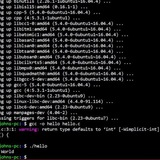
/sbin/brltty launching randomly
Hey guys,
I’m trying to start writing some noscripts for school in my ubuntu 18.04 VM and while executing it, suddenly while doing ./noscript1.sh i get the following error:
/sbin/brltty: failed to execute /sbin/brltty
I don’t use it nor did i know of its existence up until today. Any help?
https://redd.it/16x3www
@r_bash
Hey guys,
I’m trying to start writing some noscripts for school in my ubuntu 18.04 VM and while executing it, suddenly while doing ./noscript1.sh i get the following error:
/sbin/brltty: failed to execute /sbin/brltty
I don’t use it nor did i know of its existence up until today. Any help?
https://redd.it/16x3www
@r_bash
Reddit
From the bash community on Reddit
Explore this post and more from the bash community
Bash / sed on Mac adds ^M when appending to a line
I'm writing a bash noscript to append additional tab-delimited fields to (initially) the end of the first/header line of a text file on Mac. It works, but sed adds a \^M and then the added fields to the end of each line, which I can only see when I open the file with Vim. It also adds the \^M to the end of all the other lines, even though they don't match.
How do I tell sed NOT to add the \^M?
Here's my sed command:
sed '1s/$/\\tField1\\tField2$/' TESTDATA.txt
https://redd.it/16x8cez
@r_bash
I'm writing a bash noscript to append additional tab-delimited fields to (initially) the end of the first/header line of a text file on Mac. It works, but sed adds a \^M and then the added fields to the end of each line, which I can only see when I open the file with Vim. It also adds the \^M to the end of all the other lines, even though they don't match.
How do I tell sed NOT to add the \^M?
Here's my sed command:
sed '1s/$/\\tField1\\tField2$/' TESTDATA.txt
https://redd.it/16x8cez
@r_bash
Reddit
From the bash community on Reddit
Explore this post and more from the bash community
Some tricky regex and graphviz docs later, we have a decent noscript
A vimwiki graph generator using the dot language and graphviz, written in BASH.
Supports two layouts and more can be added.
Instead of a plain white elongated chart that all other such noscripts generate, this one uses the SFDP or NetworkMap layouts along with some custom coloring. Something along the lines of obsidian's graph.
link
Cheers.
https://redd.it/16xkrzf
@r_bash
A vimwiki graph generator using the dot language and graphviz, written in BASH.
Supports two layouts and more can be added.
Instead of a plain white elongated chart that all other such noscripts generate, this one uses the SFDP or NetworkMap layouts along with some custom coloring. Something along the lines of obsidian's graph.
link
Cheers.
https://redd.it/16xkrzf
@r_bash
GitHub
GitHub - wolandark/Vimwiki-Graphviz: A VimWiki Graph Generator
A VimWiki Graph Generator . Contribute to wolandark/Vimwiki-Graphviz development by creating an account on GitHub.
Weird behavior of jobs/awk command
I'm trying to catch all the background processes belonging to a certain tmux pane and kill them in one command.
For example, if I have 4 background jobs and be using the
3 3701605 running bash -c "sleep 360"
4 3701606 running bash -c "sleep 360"
5 - 3701607 running bash -c "sleep 360"
6 + 3701610 running bash -c "sleep 360"
However when I run
running
running
3701607
Or when I use
3701605 running bash -c "sleep 360"
3701606 running bash -c "sleep 360"
3701607 running bash -c "sleep 360"
which completely disregard the last line.
Does anyone have any fix ?
https://redd.it/16xm9sb
@r_bash
I'm trying to catch all the background processes belonging to a certain tmux pane and kill them in one command.
For example, if I have 4 background jobs and be using the
jobs -rp the outputs would be3 3701605 running bash -c "sleep 360"
4 3701606 running bash -c "sleep 360"
5 - 3701607 running bash -c "sleep 360"
6 + 3701610 running bash -c "sleep 360"
However when I run
jobs -pr | awk '{print $3}' it would outputrunning
running
3701607
Or when I use
jobs -pr | cut -c7- it would output3701605 running bash -c "sleep 360"
3701606 running bash -c "sleep 360"
3701607 running bash -c "sleep 360"
which completely disregard the last line.
Does anyone have any fix ?
https://redd.it/16xm9sb
@r_bash
Reddit
From the bash community on Reddit
Explore this post and more from the bash community
Calling user bash from xargs - work around
Ques: Never seen this combination of read & find .. it works but is it common?
The problem I was trying to solve calling function within the same noscript with one parameter from find and giving some additional vars. Function was exported (export -f do_stuff)
$dothis=something
$dothat=whatever
find $startdir -type d | xargs -n1 bash -c 'dostuff "$1"' - |
That will pass the directory to do_stuff but I couldn't figure out how to pass it $do_this and $do_that at the same time, gave up on that and the -exec option as well.
Found a workaround the does the job.... something I had never seen before, looks weird
while read dir ; do
dostuff $dir $dothis $dothat
done< <(find $startdir -type d -print)
​
https://redd.it/16xs04n
@r_bash
Ques: Never seen this combination of read & find .. it works but is it common?
The problem I was trying to solve calling function within the same noscript with one parameter from find and giving some additional vars. Function was exported (export -f do_stuff)
$dothis=something
$dothat=whatever
find $startdir -type d | xargs -n1 bash -c 'dostuff "$1"' - |
That will pass the directory to do_stuff but I couldn't figure out how to pass it $do_this and $do_that at the same time, gave up on that and the -exec option as well.
Found a workaround the does the job.... something I had never seen before, looks weird
while read dir ; do
dostuff $dir $dothis $dothat
done< <(find $startdir -type d -print)
​
https://redd.it/16xs04n
@r_bash
Reddit
From the bash community on Reddit
Explore this post and more from the bash community
Calling user bash from xargs - work around
Ques: Never seen this combination of read & find .. it works but is it common?
The problem I was trying to solve calling function within the same noscript with one parameter from find and giving some additional vars. Function was exported (export -f do_stuff)
$dothis=something
$dothat=whatever
find $startdir -type d | xargs -n1 bash -c 'dostuff "$1"' - |
That will pass the directory to do_stuff but I couldn't figure out how to pass it $do_this and $do_that at the same time, gave up on that and the -exec option as well.
Found a workaround the does the job.... something I had never seen before, looks weird
while read dir ; do
dostuff $dir $dothis $dothat
done< <(find $startdir -type d -print)
​
https://redd.it/16xsdwl
@r_bash
Ques: Never seen this combination of read & find .. it works but is it common?
The problem I was trying to solve calling function within the same noscript with one parameter from find and giving some additional vars. Function was exported (export -f do_stuff)
$dothis=something
$dothat=whatever
find $startdir -type d | xargs -n1 bash -c 'dostuff "$1"' - |
That will pass the directory to do_stuff but I couldn't figure out how to pass it $do_this and $do_that at the same time, gave up on that and the -exec option as well.
Found a workaround the does the job.... something I had never seen before, looks weird
while read dir ; do
dostuff $dir $dothis $dothat
done< <(find $startdir -type d -print)
​
https://redd.it/16xsdwl
@r_bash
Reddit
From the bash community on Reddit
Explore this post and more from the bash community
Running commands over cloud machine
We are automating a cloud based infrastructure. There are linux machines installed over there and I need to implement some tasks which will run linux commands on that machine.
1. Is there any doc or anything where I can find the all possible outcome of an linux command. I need this so that later the debugging becomes somewhat easy.
2. What is the best practice to implement this type of task. I am running a command and if it fails, storing the log on failure_logs and continuing for next iteration other wise moving ahead to next command. In case if there is no point of moving to next iteration I am raising an exception and catching.
https://redd.it/16xyjzr
@r_bash
We are automating a cloud based infrastructure. There are linux machines installed over there and I need to implement some tasks which will run linux commands on that machine.
1. Is there any doc or anything where I can find the all possible outcome of an linux command. I need this so that later the debugging becomes somewhat easy.
2. What is the best practice to implement this type of task. I am running a command and if it fails, storing the log on failure_logs and continuing for next iteration other wise moving ahead to next command. In case if there is no point of moving to next iteration I am raising an exception and catching.
https://redd.it/16xyjzr
@r_bash
Reddit
From the bash community on Reddit
Explore this post and more from the bash community
Problem with the AND operator
Hello, sorry for my bad english, not my first language
I am creating a bash noscript that chooses a random number and compares it with a number entered by the user.
I managed to do a part but when I tried to perfect it it started giving me errors.
My idea was that when entering a number it would be verified that it was an integer AND if it was an integer it would be verified that that number was equal to the random number of the "numal" variable.
For the second elif the same process but verified that "numal" does not match the number entered.
And if it was neither of the two that meant that it was not an integer and it gave you an error message.
Now regardless of whether I enter a number or a letter I always get the error message.
What am I doing wrong?
Here is my noscript.
#!/usr/bin/env bash
read -p "Guess the number I'm thinking: " unum
numal=$((1 + $RANDOM % 5))
re='^0-9+$'
if [ $re =~ $unum ] && [ $numal == $unum ]; then
echo "The random number is $numal"
echo "You guessed the number correctly"
elif [ $re =~ $unum ] && [ $numal != $unum ]; then
echo "The random number is $numal"
echo "You couldn't get the number right"
else
echo "You have entered incorrect parameters"
fi
https://redd.it/16y3z24
@r_bash
Hello, sorry for my bad english, not my first language
I am creating a bash noscript that chooses a random number and compares it with a number entered by the user.
I managed to do a part but when I tried to perfect it it started giving me errors.
My idea was that when entering a number it would be verified that it was an integer AND if it was an integer it would be verified that that number was equal to the random number of the "numal" variable.
For the second elif the same process but verified that "numal" does not match the number entered.
And if it was neither of the two that meant that it was not an integer and it gave you an error message.
Now regardless of whether I enter a number or a letter I always get the error message.
What am I doing wrong?
Here is my noscript.
#!/usr/bin/env bash
read -p "Guess the number I'm thinking: " unum
numal=$((1 + $RANDOM % 5))
re='^0-9+$'
if [ $re =~ $unum ] && [ $numal == $unum ]; then
echo "The random number is $numal"
echo "You guessed the number correctly"
elif [ $re =~ $unum ] && [ $numal != $unum ]; then
echo "The random number is $numal"
echo "You couldn't get the number right"
else
echo "You have entered incorrect parameters"
fi
https://redd.it/16y3z24
@r_bash
Reddit
From the bash community on Reddit
Explore this post and more from the bash community
Seeking help understanding a request for Bash noscript for an interview.
I have an interview question for a sysadmin job and need clarification about what's being asked. Is it just me, or does this make sense? I'm wondering what's expected here as I need clarification. What are the parameters if they are not defined? For example, how can I write a noscript if there are no values specified for each of these parameters?
## Instructions
Using a language of your choice, write a noscript that can be used as either a scheduled windows task or a cron job to delete files and/or directories using the parameters listed below:
1. File Age
1. You’re free to choose what metadata to use to determine file age
2. File Location
3. File Size
4. File Type (extension)
5. Delete folders and files
6. Delete files only
https://redd.it/16y6s5z
@r_bash
I have an interview question for a sysadmin job and need clarification about what's being asked. Is it just me, or does this make sense? I'm wondering what's expected here as I need clarification. What are the parameters if they are not defined? For example, how can I write a noscript if there are no values specified for each of these parameters?
## Instructions
Using a language of your choice, write a noscript that can be used as either a scheduled windows task or a cron job to delete files and/or directories using the parameters listed below:
1. File Age
1. You’re free to choose what metadata to use to determine file age
2. File Location
3. File Size
4. File Type (extension)
5. Delete folders and files
6. Delete files only
https://redd.it/16y6s5z
@r_bash
Reddit
From the bash community on Reddit
Explore this post and more from the bash community
Copy all folders that start with a capital letter
What would the command be to copy all folders and their contents in the current directory that start with a capital letter to another folder?
I've looked, but haven't seen a clear example that answers this question.
For example, if the current directory contains the following folders:
Blue
greEn
Red
The folders that start with a capital would be copied to a folder called colors.
https://redd.it/16ya63s
@r_bash
What would the command be to copy all folders and their contents in the current directory that start with a capital letter to another folder?
I've looked, but haven't seen a clear example that answers this question.
For example, if the current directory contains the following folders:
Blue
greEn
Red
The folders that start with a capital would be copied to a folder called colors.
https://redd.it/16ya63s
@r_bash
Reddit
From the bash community on Reddit
Explore this post and more from the bash community
bash code to waste bandwidth
so i don't know if this belongs here, but i've been trying some code with gpt to try and waste bandwidth, the best we came up with was this:
while true; do
sudo arp-scan --localnet | grep -oE '(0-9{1,3}\.){3}0-9{1,3}' | xargs -I % sudo ping -f %
done
but it didn't quite do much. it slowed down the entire network a small bit but that's all. anyone got code that could help me waste bandwidth? in bash, so mostly simple like the one i put here
https://redd.it/16ydtpq
@r_bash
so i don't know if this belongs here, but i've been trying some code with gpt to try and waste bandwidth, the best we came up with was this:
while true; do
sudo arp-scan --localnet | grep -oE '(0-9{1,3}\.){3}0-9{1,3}' | xargs -I % sudo ping -f %
done
but it didn't quite do much. it slowed down the entire network a small bit but that's all. anyone got code that could help me waste bandwidth? in bash, so mostly simple like the one i put here
https://redd.it/16ydtpq
@r_bash
Reddit
From the bash community on Reddit
Explore this post and more from the bash community
sftp not working when triggered by cron
I have this noscript and it works fine when I run it by myself, but when it's triggered by cron everything works except copying files with sftp. It copies only a few random files from the list. Has anyone had such a problem? It worked fine with scp in the past but then scp started to break the connection when the files grew above 2GBs and I couldn't find the reason.
Thanks in advance
FILES=$(find /var/log/CPbackup/backups/ -name 'backup*' -mtime -1)
for file in $FILES
do
echo $file >> /var/log/CPbackup/backupcopy.log
echo "put $file /APPTEST-APP/" | sshpass -p 'password' sftp -vvv backup@172.1.1.1 2>&1 /var/log/CPbackup/backupcopy.log
echo "==========================================================" >> /var/log/CPbackup/backupcopy.log
done
​
https://redd.it/170ffpt
@r_bash
I have this noscript and it works fine when I run it by myself, but when it's triggered by cron everything works except copying files with sftp. It copies only a few random files from the list. Has anyone had such a problem? It worked fine with scp in the past but then scp started to break the connection when the files grew above 2GBs and I couldn't find the reason.
Thanks in advance
FILES=$(find /var/log/CPbackup/backups/ -name 'backup*' -mtime -1)
for file in $FILES
do
echo $file >> /var/log/CPbackup/backupcopy.log
echo "put $file /APPTEST-APP/" | sshpass -p 'password' sftp -vvv backup@172.1.1.1 2>&1 /var/log/CPbackup/backupcopy.log
echo "==========================================================" >> /var/log/CPbackup/backupcopy.log
done
​
https://redd.it/170ffpt
@r_bash
Reddit
From the bash community on Reddit
Explore this post and more from the bash community
Better control over the text in a terminal emulator's noscript bar
So a lot of us use some escape characters in
But if I run the command in a new terminal window, the noscript bar text is indeed 'sleep'
Other programs change the noscript bar even in my current window (for example, some ROS programs).
Anyway, does anyone know if there's a way to prevent programs from changing the noscript bar text? In another thread, someone said that these programs are changing the text through the same escape characters that are used by
If anyone has ideas here, or even just knows where to start looking, I'd appreciate it.
https://redd.it/1710fqs
@r_bash
So a lot of us use some escape characters in
PS1 to set the terminal emulator's noscript text whenever there's a new prompt. I've been customizing this and using the resulting text for various purposes. However, frustratingly, this is not the only thing that affects the text. When certain commands are run in the bash session, they also cause the noscript text to change. To be honest, I don't have a great understanding of what does or doesn't cause the text to change. For example, this does not:sleep 5But if I run the command in a new terminal window, the noscript bar text is indeed 'sleep'
kitty -- sleep 5Other programs change the noscript bar even in my current window (for example, some ROS programs).
Anyway, does anyone know if there's a way to prevent programs from changing the noscript bar text? In another thread, someone said that these programs are changing the text through the same escape characters that are used by
PS1. This led me to wonder if it's possible to change the escape characters for writing text to the noscript bar. It seems likely this would be possible, but I don't know if it's a change in bash or readline, or maybe a change in the source code of your terminal emulator (I'm using kitty, obviously).If anyone has ideas here, or even just knows where to start looking, I'd appreciate it.
https://redd.it/1710fqs
@r_bash
Reddit
From the bash community on Reddit
Explore this post and more from the bash community
I build a tool to supercharge bash noscripts running
https://github.com/docsion/rfsh
https://redd.it/1710pc8
@r_bash
https://github.com/docsion/rfsh
https://redd.it/1710pc8
@r_bash
GitHub
GitHub - docsion/rfsh: RFSH: Run shell noscripts in batch, concurrently, fully customized with variable .
RFSH: Run shell noscripts in batch, concurrently, fully customized with variable . - docsion/rfsh
Has anyone else overthought their command line and shell setups?
I've written some posts where I've put a lot of thoughts into individual things like which shell or prompts. I'm a quite a perfectionist, and even though I could just do fine with whatever shell and terminal an OS comes with, there are lots of features and nice stuff you can add, and they take time to learn and setup. If I commit to using one software whether its a shell, a CLI, or prompt, I want to be sure that its the one I actually want to use more than others and don't want to sink time into one just to find out I would prefer another.
Should I have a posix compatible shell like Bash or Zsh, or would I benefit from a non conforming one like Fish, at least as an interactive shell? Should I use a prompt with more features like Oh My Posh, or one that's easier to setup like Starship? Starship uses toml while Oh My Posh uses JSON or JSON-like formatting.
https://redd.it/171035o
@r_bash
I've written some posts where I've put a lot of thoughts into individual things like which shell or prompts. I'm a quite a perfectionist, and even though I could just do fine with whatever shell and terminal an OS comes with, there are lots of features and nice stuff you can add, and they take time to learn and setup. If I commit to using one software whether its a shell, a CLI, or prompt, I want to be sure that its the one I actually want to use more than others and don't want to sink time into one just to find out I would prefer another.
Should I have a posix compatible shell like Bash or Zsh, or would I benefit from a non conforming one like Fish, at least as an interactive shell? Should I use a prompt with more features like Oh My Posh, or one that's easier to setup like Starship? Starship uses toml while Oh My Posh uses JSON or JSON-like formatting.
https://redd.it/171035o
@r_bash
Reddit
From the bash community on Reddit
Explore this post and more from the bash community
Hi, I'm sharing ydf, a disruptive dotfiles manager+
Avoid repetitive work and errors, focus on what matter
Be ready to work in just a few minutes on your Fresh OS
Declare your working environment and Automate its configuration
New member on the team?, reproduce your colleague working environment and start working now
***https://github.com/yunielrc/ydf***
https://redd.it/171ehhd
@r_bash
Avoid repetitive work and errors, focus on what matter
Be ready to work in just a few minutes on your Fresh OS
Declare your working environment and Automate its configuration
New member on the team?, reproduce your colleague working environment and start working now
***https://github.com/yunielrc/ydf***
https://redd.it/171ehhd
@r_bash
GitHub
GitHub - yunielrc/ydf: A dotfiles manager+. Be ready to work in just a few minutes on your Fresh OS
A dotfiles manager+. Be ready to work in just a few minutes on your Fresh OS - yunielrc/ydf
AND OR comparison in IF
Hey everyone,
Breaking my head over this one and cannot seem to get it to work apart from a long || [ $var = 0\] || [$var =1\] .. etc string. I cannot get my comparison right! Is there anyone willing to give me a pointer?
I am trying to check of $var is either "index" OR 0,1,2,3,4,5,6,7,8,9,10.
Code:
#!/bin/bash
var="${1:-index}"
if [ $var = "index" \] || [ $var -ge 0 && $var -ls 11 \]; then <------- problem line
\# some code, var is either "index" or 1...10
else
\# some code, var is any other value
fi
https://redd.it/171krob
@r_bash
Hey everyone,
Breaking my head over this one and cannot seem to get it to work apart from a long || [ $var = 0\] || [$var =1\] .. etc string. I cannot get my comparison right! Is there anyone willing to give me a pointer?
I am trying to check of $var is either "index" OR 0,1,2,3,4,5,6,7,8,9,10.
Code:
#!/bin/bash
var="${1:-index}"
if [ $var = "index" \] || [ $var -ge 0 && $var -ls 11 \]; then <------- problem line
\# some code, var is either "index" or 1...10
else
\# some code, var is any other value
fi
https://redd.it/171krob
@r_bash
Reddit
From the bash community on Reddit
Explore this post and more from the bash community
Update noscript
Hi guys, one of my clients want a noscript to automatically update one executable, i've made basically everything when it comes to get the file and make the appropriate BUT the update check part xD
So, this is the noscript:
rm "/home/user/Appimages/App.AppImage"
curl "client website" --output "/home/user/Appimages/App.7z"
7z x "/home/user/Appimages/App.7z"
mv "/home/user/Appimages/App/App.AppImage" "/home/user/Appimages/App.AppImage"
rm "/home/user/Appimages/App.7z"
rm -r "/home/user/Appimages/App"
It works, but 2 things are missing, first i am using this command here:
testvariable=$(curl -s "$updatewebsite" | grep 'Last Update')
Basically it's returning me this line:
<h2>Last Update (v1.20.0)</h2>
I want grep to specifically get the version number, like "v.1.20.0", save to a file in the directory IF there is no version.txt file there, if there is a file, grab the number, check if it is higher and then execute the command above to update the appimage, can you guys help?
https://redd.it/171q8zd
@r_bash
Hi guys, one of my clients want a noscript to automatically update one executable, i've made basically everything when it comes to get the file and make the appropriate BUT the update check part xD
So, this is the noscript:
rm "/home/user/Appimages/App.AppImage"
curl "client website" --output "/home/user/Appimages/App.7z"
7z x "/home/user/Appimages/App.7z"
mv "/home/user/Appimages/App/App.AppImage" "/home/user/Appimages/App.AppImage"
rm "/home/user/Appimages/App.7z"
rm -r "/home/user/Appimages/App"
It works, but 2 things are missing, first i am using this command here:
testvariable=$(curl -s "$updatewebsite" | grep 'Last Update')
Basically it's returning me this line:
<h2>Last Update (v1.20.0)</h2>
I want grep to specifically get the version number, like "v.1.20.0", save to a file in the directory IF there is no version.txt file there, if there is a file, grab the number, check if it is higher and then execute the command above to update the appimage, can you guys help?
https://redd.it/171q8zd
@r_bash
Reddit
From the bash community on Reddit
Explore this post and more from the bash community
Escape for Conky noscript
I am writing up a small bash noscript so that I can do a quick-configure.
It's pretty much a noscript I can change and run the code to just auto inject. And it's only one file instead of two.
The issue is, I am adding it to a conf file using EOF, and things need escaped in order for it to inject properly.
I'm having issues escaping the line with
and
I've been going through Google reading on how to escape each letter, including dashes, which recommends to add two dashes in front
So the question is, how the hell do I escape that line properly so that it can be used inside
I also read about
https://redd.it/171ql74
@r_bash
I am writing up a small bash noscript so that I can do a quick-configure.
It's pretty much a noscript I can change and run the code to just auto inject. And it's only one file instead of two.
The issue is, I am adding it to a conf file using EOF, and things need escaped in order for it to inject properly.
conky.text = [[
\${color1}\${font ConkySymbols:size=20}t\${font} \${voffset -10}GNU/Linux» \$hr \${color}
\${color1}\${goto 35}OS     : \${color}\${execi 86400 cat `ls -atr /etc/*-release | tail -2` | grep "PRETTY_NAME" | cut -d= -f2 |  sed 's/"//g'}
\${color1}\${goto 35}Kernel : \${color}\$kernel on \$machine
I'm having issues escaping the line with
`ls -atr /etc/*-release | tail -2`
and
cut -d= -f2 | sed 's/"//g'
I've been going through Google reading on how to escape each letter, including dashes, which recommends to add two dashes in front
--, however, the noscript errors out with these:cat: '`ls': No such file or directory
cat: -atr: No such file or directory
tail: cannot open '-2`' for reading: No such file or directory
So the question is, how the hell do I escape that line properly so that it can be used inside
sudo tee "${config_folder}/${config_file}" >/dev/null <<EOF

Code Here

}
I also read about
<<'EOD' but came to read that it shows the text exactly as it is written, and I can't add variables inside. And I need the noscript to accept a few variables that will be added to the noscript when the noscript is ran.https://redd.it/171ql74
@r_bash
Reddit
From the bash community on Reddit
Explore this post and more from the bash community
A telegram bot to backup files and directories and send them as tar archieves to yourself
https://github.com/wolandark/TSBB
https://redd.it/171wt9h
@r_bash
https://github.com/wolandark/TSBB
https://redd.it/171wt9h
@r_bash
GitHub
GitHub - wolandark/TSBB: Telegram Server Backup Bot Written in BASH
Telegram Server Backup Bot Written in BASH. Contribute to wolandark/TSBB development by creating an account on GitHub.
If you wanted to explain to a new linux user why they need to learn bash, how would you do it?
how would you explain to a new linux user why they need to learn bash and the command line interface? what would you tell them to make them understand how important bash is to getting the most out of their linux distro?
what specific reason would you give them?
thank you
https://redd.it/1727jlo
@r_bash
how would you explain to a new linux user why they need to learn bash and the command line interface? what would you tell them to make them understand how important bash is to getting the most out of their linux distro?
what specific reason would you give them?
thank you
https://redd.it/1727jlo
@r_bash
Reddit
From the bash community on Reddit
Explore this post and more from the bash community